Friday, May 28, 2010

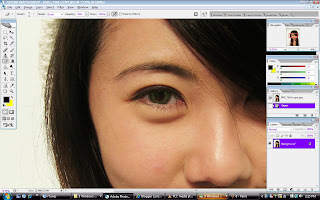
making the eye look bigger and brighter

Before closeup

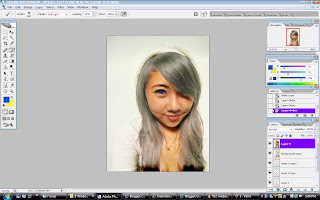
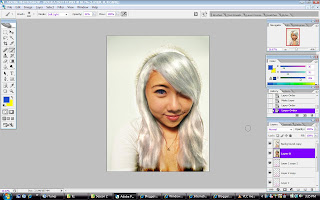
So here was where we left off after making her hair silver/white. I had already coloured the eye blue in there. I'm using Photoshop CS2.
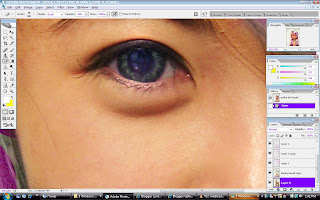
Now firstly for the eye I used the dodge tool, set it to 17% exposure and range to Highlight. Then I used a brush the same size as the Iris and highlighted it a few times till it became light enough for thee blue to cover it. Then I chose a nice blur, set the colour opacity to 36% and the blending options to darken and I coloured the eye in. Now zooming in youcan see the blue tinge and that looks ery unnatural. We're gonna cover that darker part up with black.
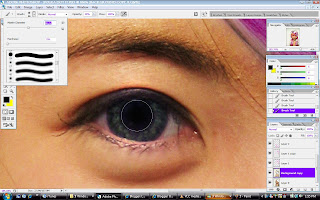
Use a brush size that covers only the darker area and paint it black. Use a 20% opacity to gradually cover it up. It's always safer to put on light layers first. This part is optionl but I also then used bit of yellow to go around the colored part of the eye to bring out the green some more. Now we've got a sky and ocean combined colour. The eyes already look slightly bigger and brighter however if you want to make it bigger you can always use the liquify tool under Filter. Select the bloat tool, adjust brush size to slightly bigger than the eye and bloat it to as big as you want it to be.
So next we are going to get rid of the puffyness underneath the eye. This is the most fun. Use the spot heling tool and set it to replace and just go over the part you want to hide. You may find that someties the skincoloour doesn't blend but that's ok justgo over it again until you do, or you can use the clone stamp tool to select the area you would like to literally "clone". Then use it over the un even skin colour to blend it in. Also you can use the spot healing tool an adjust the mode to darken or lighten parts.
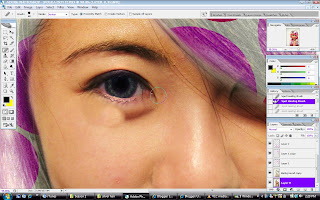
This is my result after a combination of "replace" and "darken" spot healing tool and the clone stamp tool.
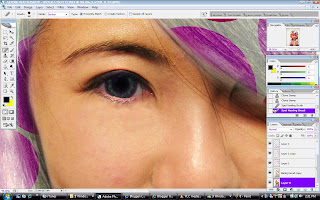

So here's the befores and after results


Thursday, May 27, 2010

How to photoshop black/brown hair to white/silver


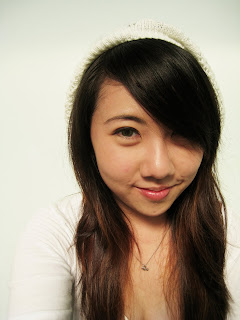
So here's the original. Her hair is black at the top and sort of brown at the bottom from previous colouring. She gave me a challenge to make her hair pink with white polka dots. Stupid me said I'd do it white with pink polka dots which was even harder and I wasn't sure if it will work.

So as usual we first get the photo on photoshop I'm using CS2 and we make a background copy by right clicking the image on the bottom right corner and selecting Duplicate Layer. Then we follow the same step as the previous tutorial where I coloured her hair orange and red. Now because white against black is weak you will have to make several layers over and over. Set your brush to 100% opacity and normal blending and just paint white all over the hair.


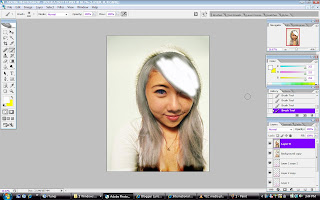
In the photo below her hair already looks grey because I've gone through 3 layers and combined them. you don't have to combine them. Then after you finished painting the parts you want. in the right hand corner change your blending options to "Soft Light" to create a more natural look. Use your eraser or history brush to touch up parts. Set the opacity to 68% to be more gentle on the photo. Repeat the entire process until you get the right shade you want. Don't worry about it not looking realistic yet. I'll go through that later.

Now after achieving the shade you want get your dodge tool and set exposure to 17% and your range to "Highlights". It's good if your original picture captures the light reflected off the hair because then you can use tht as your guideline. Use your dodge tool to go over the entire hair area first, then once you're done concentrate on those light reflecting parts only. This gives the illusion that the hair is part of the image.
Next post I'll go through something funky like adding polka dots to the hair and changing her eye colour. In the original she's wearing green/brown contacts, here I've changed it to blue.


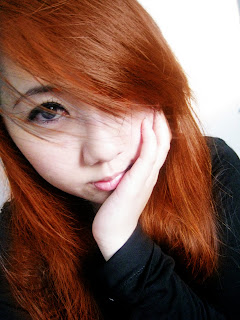
How to photoshop black hair to orange/red

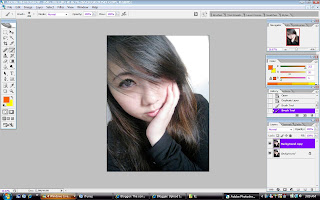
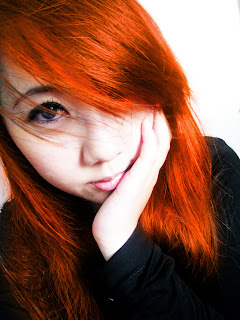
Started out with me chatting to my bestie Lizzie and we somehow got this point where she sent me two photos and asked me to make her hair red/ bright. Then she went off for dinner. Here's the original photo. Isn't she just so cute?!


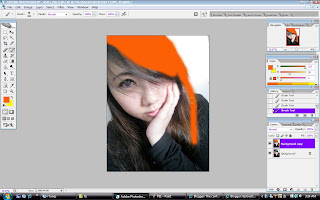
Firstly we start of by getting the photo onto photoshop. I'm using CS2. Make a copy of the background layer by right clicking "Background" and selecting "duplicate Layer". This is the layer you will be working on. (I'm really suppose to be sleeping/studying). Set your brush to "normal" and opacity to 100%. Then choose the brush tool and select your colour. It's better to choose a brush with a softer circumference. The size depends on you, larger brush would cover the larger parts quicker. Smaller sizes for those few strands of hair covering the eyes.


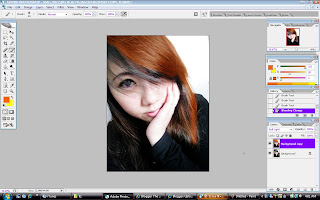
This part may seem intimidating but don't be afraid. Use your brush and cover the entire hair area or parts of it if you want to do streaks. There's no need to change your colours. Once you've finished with that on the right bottom corner where it says "Layers" you will see a white bar, that's your "Blending options". Choose "soft light" and your result should be as the picture after this.
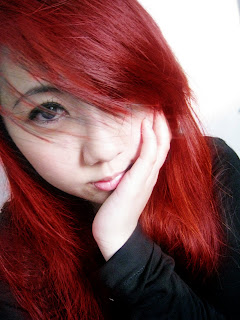
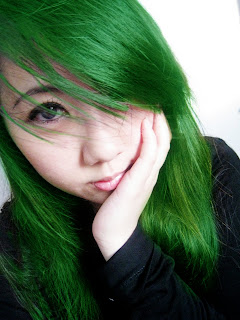
You can play with the blending options to alter the results you get. Soft Light gives a more natural result while "Color" would give a more vibrant rockstar poster effect. Reminds you of Hayley Williams, no?


Play with colours as well! Here's a red because she requested, and a green just for laughs.

Tuesday, March 30, 2010

Pieces


He said to me, "they can take us apart, but they can never take away our memories."


I realised I always spend too much time worrying about the future, thinking too far ahead and getting upset over something that hasn't happened and might not happen. Instead of worrying about the future I should concentrate more on my present and enjoy it. Because these are going to be the memories that will stay with me all my life. I need to make the most of it and make sure it's the best it will ever be.


Someday I'm going to look back and whether I think of this with a tear or a smile, nothing's gonna change it. It happened and hey, no regrets :)


Tuesday, November 24, 2009

jump then fall

omg I've to seriously stop being nocturnal! Either that or find more people that are nocturnal like me besides Syasya and find a uni that has night classes instead of day time ones. Maybe I need to take night time jobs as well and by night time jobs I meant ones that allows me to remain in my clothes still.

3 hours till calculus exam and at first I was hyperventilating and now I'm just giving up hope. I'm seriously so gonna fail this anyways but then again I'm going to apply for a change of course so I'll be behind a year still anyways. But then apart of me is telling me not to. I hate giving in and I also hate losing which leaves me stuck to one option and that's to perservere and don't lose!

hmm 4 cans of red bull and I feel like throwing up or dancing. Preferably the latter. I keep thinking of my freedom after this paper and all the stuff I want to and NEED to do and at the same time i'd rahter the exam to be miraculously pushed to Friday so I'll have more time, I'd sing Hallelujah in the chapel if that happens.

I've also been having thoughts of getting run over by a car along the way so I won't have to sit for the exam. But that also means no clubbing on Thursday and Sunday. Again stuck in a bad situation.

On another note I'm in love all over again! With Red Jumpsuit Apparatus again. emo post-hardcore music gets me everytime!

"Step Right Up shoot an arrow on the target, my heart is an easy thing for you to win, don't worry if you miss I'll let you shoot again, my heart is an easy thing for you to win"

OMG Elias Reidy why did you have to leave the band!!! rarrr you and Ronnie Winters were like brothers not to mention yr the most perfect backup vocalist and guitarist for the band! Now it's all Ronnie alone :(

step right up


pretty heart shaped and teardrop raised beads on buckle (won't fall off)


black tiered dress used once at my formal


close up of details and bow


belt might be sold together with yellow dress

yellow's not really my colour and trapeze dresses aren't really my style

Sunday, October 18, 2009

I'm an Auntie!!!! wooo

Finally!!

My cousin's baby boy just came into the world on the 18th October. Aww I can't wait to see him! and cuddle him, hold his lil hand and pinch his lil nose. omg so excited!! I want pictures of him scat! Can't wait till December man!

omg omg i get to go baby clothes shopping!!!